Resources
Document Conversion
You can easily convert documents to an alternative, accessible format with SensusAccess. The use of SensusAccess requires a “carlow.edu” email address. If you need help, watch this video.
Policies and Guidelines
Carlow University references several sources in making adjustments to provide for the needs of students with disabilities. They include:
- Policy Regarding Reasonable Accommodations
- Guidelines for Seeking Accommodations
- Implementation of Approved Accommodations
- Documentation Guidelines for Students Requesting Accommodations
Assistive Technology
- Sensus Access and Document Conversion
- Read and Write Gold
- DSO Guides on Assistive Technology
- Microsoft AT Quick Start Guides
How to schedule an appointment in Accommodate:
- Log into the Accommodate Portal using your Carlow username and password.
- Select the “Appointments” tab on the menu on the left side of the screen.
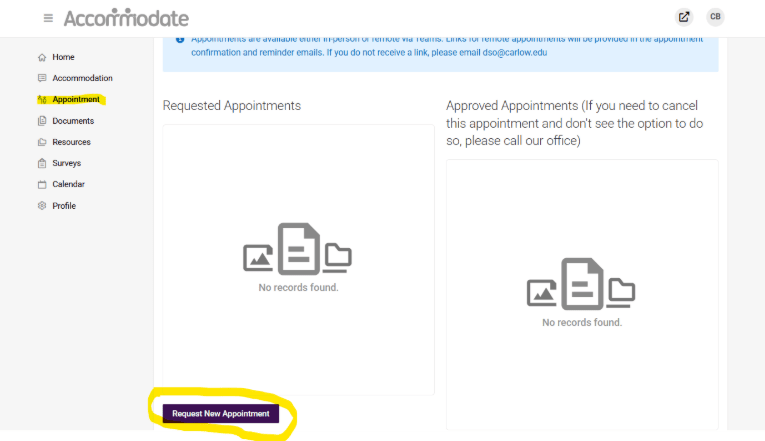
- Select “Request new appointment”
- For Type, choose the proper appointment type
- For Location, choose “In-person” or “Remote”
- For Counselor, you may leave blank or choose the name of a specific person
- Ignore the rest of the fields
- Click “Check Availability” in purple at the bottom of the screen.
- This will load available times for appointments.
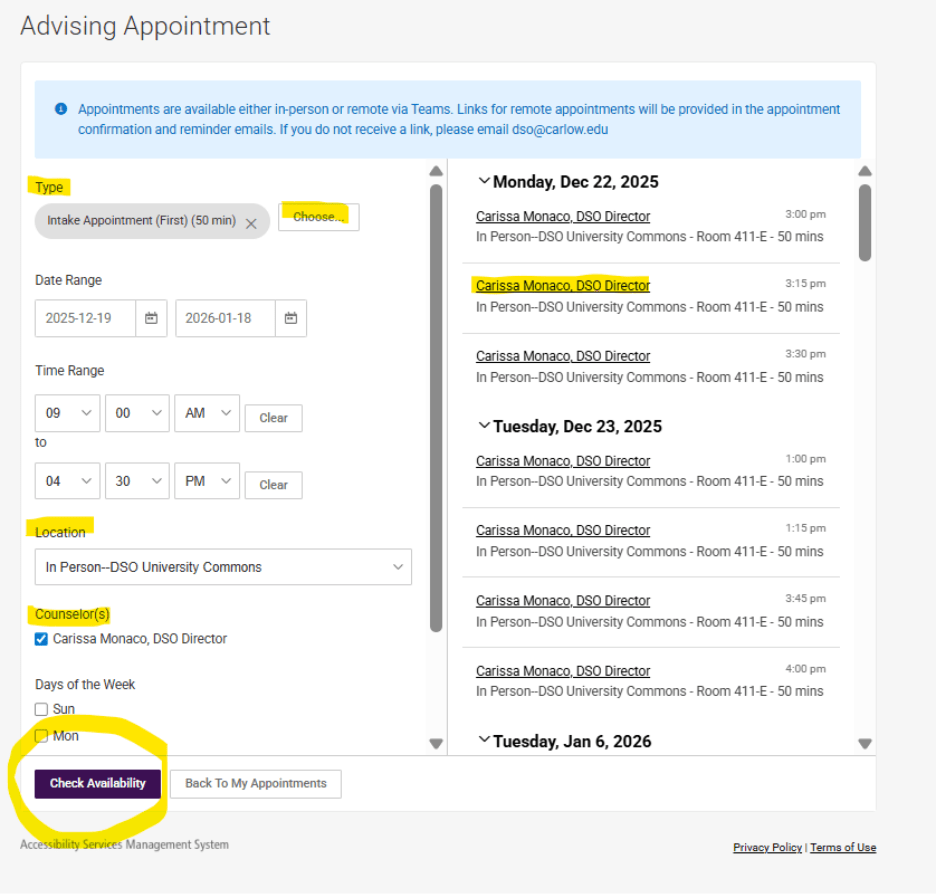
- Review the availability options and click on the appointment you’d like to request.
- Review the appointment details and add information under “Additional Notes” to help DSO staff prepare for your appointment.
- Click “Submit Request”
Once your appointment request has been approved, you will receive a follow up email confirming the date and time and a link for virtual appointments.
© Copyright 2024 Carlow University. All rights reserved.
Carlow University prohibits sex discrimination in any education program or activity that it operates. Individuals may report concerns or questions to the Title IX Coordinator, Carissa Monaco at titleix@carlow.edu or 412-578-6050.